The Problem with Defending Your Report
Ctrl+F misses testimony worded differently.
Support phrased in different words than your report never matches your search terms.
Re-verifying every claim is slow.
Combing depositions, records, and exhibits before every deposition eats days of prep.
One unsupported claim is all they need.
A single gap between your report and the record hands opposing counsel their impeachment — and it follows you into every future case.
How Trace Works
From case file to citation.
Upload your case file
Deposition transcripts, records, and exhibits securely processed.
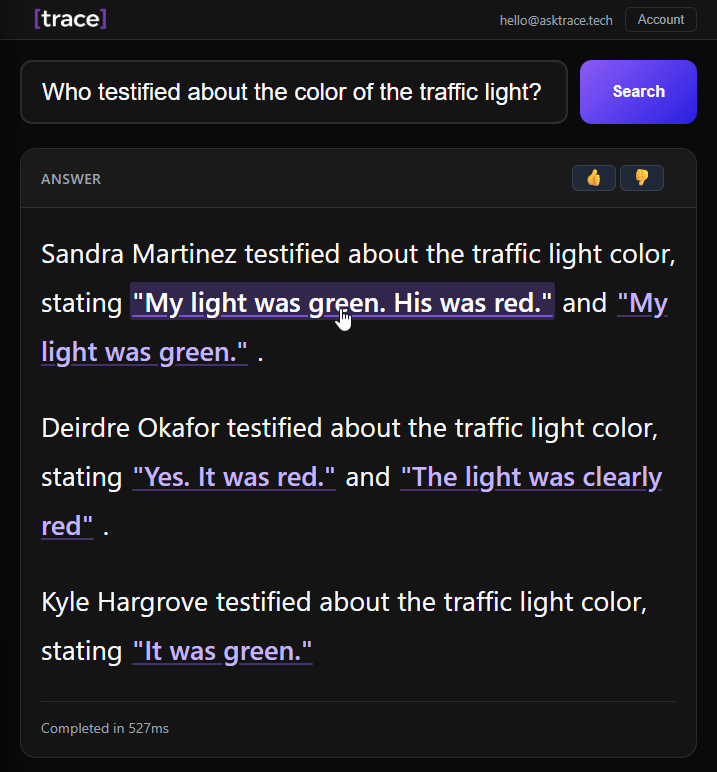
Ask where the record supports a claim
Search in plain English, like you'd ask a trusted colleague.
Get exact page-cited answers
Every result links to the original source — or Trace tells you the support isn't there.
What Trace Can Do
Built for defending expert opinions.
Precise Fact Retrieval
Get page-cited answers from every document in your case file.
Cross-Document Analysis
See what every deposition and record says about the same fact, side by side.
Citation Trail Structuring
Turn a scattered case file into a claim-by-claim citation trail for your report.
Chronology Construction
Put events, records, and testimony in order with page cites.
Unsupported Claim Detection
If the record doesn't support a claim, Trace says so — before opposing counsel does. It never invents support.
Key Testimony Extraction
Pull the passages that matter most, with citations.
Precise Fact Retrieval
Get page-cited answers from every document in your case file.
Cross-Document Analysis
See what every deposition and record says about the same fact, side by side.
Citation Trail Structuring
Turn a scattered case file into a claim-by-claim citation trail for your report.
Chronology Construction
Put events, records, and testimony in order with page cites.
Unsupported Claim Detection
If the record doesn't support a claim, Trace says so — before opposing counsel does. It never invents support.
Key Testimony Extraction
Pull the passages that matter most, with citations.
Built for Litigation-Grade Confidentiality
Your case files are protected by enterprise-grade security controls.
Bank-Grade Encryption
AES-256 at rest and TLS 1.3 in transit. All documents are encrypted end-to-end.
Built on SOC 2 Type II Certified Infrastructure
Hosted on SOC 2 Type II infrastructure with continuous monitoring and audit logging.
No Data Used for Training
Your documents are never used to train AI models. Data ownership remains with you.
Confidential by Design
Only authorized team members can access your matters. Access controls protect client and case confidentiality.
Ready to Walk Into Your Next Deposition With Every Citation in Hand?
Join the expert witness pilot and cut report verification from days to hours — with a citation trail you can defend under oath.
Limited access for select experts.
Frequently Asked Questions
Everything you need to know about Trace and how it works.
Is this AI?
Mostly no. Trace is a search tool — it finds what the record actually says and shows you the exact page reference. AI is only used to understand your question and present the results clearly. It can't make up answers. If it's not in the case file, it says "not found." Think of it as a smarter Ctrl+F, not a chatbot.
Is my data secure?
Yes. Your files are encrypted and stored on SOC 2 certified servers. Your documents are never used to train AI models. Only your team can see your matters — designed from the ground up to protect client and case confidentiality.
How accurate are the results?
Every answer includes the source document and exact page number so you can check it yourself in seconds — the same way you'd verify it before citing it under oath. We'd rather show you a few highly accurate results than flood you with guesses.
How is this different from just using ChatGPT?
ChatGPT can make things up — and it may use your data to train its models. If you ask it about a case file, it may give you a confident answer that's completely wrong, which is disqualifying for anyone who has to defend that answer under oath. It also has strict page limits, so a case file with multiple depositions and thousands of pages of records won't fit. Trace only returns what's actually in your documents, handles case files of any size, and never trains on your data.
Do I need to change how I work?
No. We handle all the setup. Just send us your case file and we take care of the rest. You keep writing reports and prepping for testimony the same way — Trace just makes the verification part faster.
Can I search across multiple documents at once?
Yes — this is one of Trace's best features. Send us the entire case file for a matter and search it all at the same time. See what different depositions, records, and exhibits say about the same fact, and spot conflicts and gaps instantly.
What file formats work with Trace?
We handle the upload for you. Just send us your case file — deposition transcripts, PDFs, scanned documents, financial records, exhibits — and we take care of the rest. Most are ready to search within minutes.
Can I use Trace on medical records?
Not yet. Matters built around protected health information (PHI) — IME work, chart review, med-mal record review — require a compliance setup we're still building. Trace currently supports non-PHI case files: depositions, financial records, employment files, and technical documents.
What happens to my documents?
Your documents are encrypted, stored securely, and never used to train AI models. Only your authorized team members can access your matters. You can request deletion at any time — including when a matter closes or a protective order requires it.